State Bank of India (SBI), the country’s largest public sector bank, serves over 50 crore customers — and a vast majority of them now manage their accounts online. SBI Net Banking, also known as OnlineSBI, is one of the most comprehensive internet banking platforms in India, allowing customers to handle nearly every banking activity from the comfort of their home or office. From transferring funds and paying bills to opening fixed deposits, applying for loans, and downloading account statements — it all happens with a few clicks.
That said, getting started can feel a little overwhelming for first-time users, especially when it comes to registration, navigating the dual-password system, or recovering access after forgetting credentials. This detailed guide walks you through everything you need to know about logging into SBI Net Banking, registering as a new user, and resetting your passwords — all using the official portal at https://onlinesbi.sbi.bank.in.
What Is SBI Net Banking?
SBI Net Banking is the bank’s secure online platform that gives retail and corporate customers 24×7 access to their accounts. The service lets you transfer funds within SBI or to other banks via NEFT, RTGS, IMPS, and UPI; pay utility bills, taxes, and credit card dues; open or close fixed and recurring deposits; apply for loans; manage demat accounts; and request services like chequebooks, debit cards, or KYC updates.
The service is completely free for SBI account holders and works across desktops, laptops, and mobile browsers. The portal is protected by encryption, image captchas, and OTP-based two-factor authentication, ensuring your data and money stay safe.
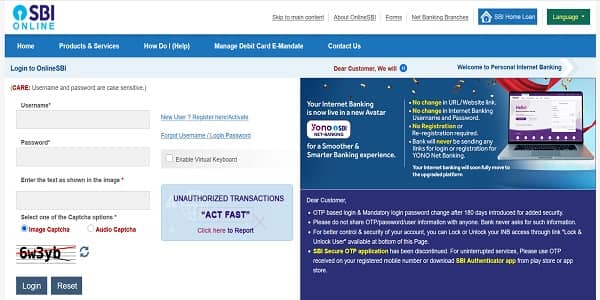
How to Login to SBI Net Banking
Once your net banking is activated, logging in is straightforward. Here’s the step-by-step process:
Step 1: Open your browser and visit the official SBI Net Banking portal at https://onlinesbi.sbi.bank.in.
Step 2: Under the “Personal Banking” section, click on “Login”, then click “Continue to Login”.
Step 3: Enter your Username and Login Password in the respective fields. Remember, the password is case-sensitive.
Step 4: Solve the Image Captcha displayed on the screen to confirm you’re not a bot.
Step 5: Click the “Login” button. SBI will send a One-Time Password (OTP) to your registered mobile number for added security. Enter the OTP to access your dashboard.
Step 6: First-time login only — you’ll be prompted to set a Profile Password (separate from your login password) and select a hint question for future password recovery.
A note of caution: entering the wrong password three times in a row will lock your account for 24 hours, so type carefully or use the on-screen virtual keyboard if you’re unsure.
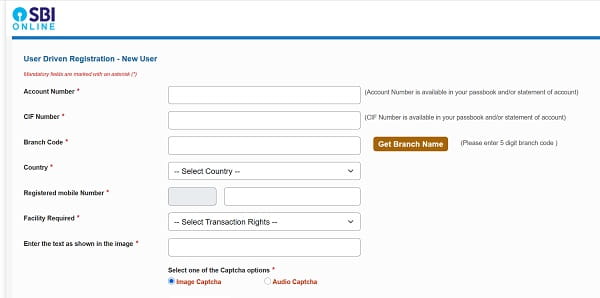
New User Registration: Step-by-Step Process
If you don’t already have a Pre-Printed Kit (PPK) issued by your branch, you can register for SBI Net Banking online using your ATM card. The process takes just a few minutes.
Online Registration Process
Step 1: Visit https://onlinesbi.sbi.bank.in and under the “Personal Banking” section, click on “New User Registration/Activation”.
Step 2: In the pop-up window, select “New User Registration” and click “Next”.
Step 3: Fill in the required details — your Account Number, CIF Number, Branch Code, Country, Registered Mobile Number, and the Facility Type. For complete access, select “Full Transaction Rights”.
Step 4: An OTP will be sent to your registered mobile number. Enter this High-Security Password (OTP) to verify your identity.
Step 5: On the next screen, choose “I have my ATM card” to complete the registration online instantly. Enter your ATM card details and PIN for validation.
Step 6: Once verified, you’ll be prompted to create your Username and Login Password. Choose a strong password combining uppercase letters, lowercase letters, numbers, and special characters.
Step 7: Submit the details. Your registration is complete, and you can log in immediately using your new credentials.
Branch-Based Activation
If you don’t have an SBI ATM card, select “I do not have my ATM card” during registration. The system will generate a temporary username, but you’ll need to download the registration form, fill it out, and submit it to your home branch for final activation. Customers who already have a Pre-Printed Kit from their branch can skip online registration and log in directly using the User ID and password provided in the kit.
How to Reset Your SBI Net Banking Passwords
SBI uses a dual-password system — a Login Password to access the portal and a Profile Password to authorise sensitive actions like adding beneficiaries or changing personal details. Here’s how to reset each.
Reset Login Password
Step 1: On the login page at https://onlinesbi.sbi.bank.in, click on “Forgot Login Password”.
Step 2: Select “Forgot My Login Password” from the dropdown and click “Next”.
Step 3: Enter your Username, Account Number, Country, Registered Mobile Number, and Date of Birth.
Step 4: Choose your preferred reset method:
- Using Profile Password — enter your existing profile password to instantly create a new login password.
- Using ATM Card — authenticate with your debit card details and PIN.
- Via OTP or Branch — request an OTP to your registered mobile, or visit your branch for manual reset.
Step 5: Once verified, set your new Login Password, confirm it, and submit. You can log in immediately with your fresh credentials.
Reset Profile Password
Step 1: Log into your account using your Username and Login Password.
Step 2: Navigate to “Profile” → “Forgot Profile Password”.
Step 3: Choose one of the available reset options:
- Hint Question — answer the security question you set during your first login.
- ATM Debit Card — authenticate using OTP and card details.
- Visiting Branch — if you can’t recall the answer or don’t have card access, select this option for a manual reset at your home branch.
Step 4: Set your new profile password, confirm it, and submit.
Important Security Tips
While SBI maintains strong digital infrastructure, your habits play an equally important role in keeping your account safe. Always log in only through the official URL, https://onlinesbi.sbi.bank.in, and verify the padlock symbol in your browser before entering credentials. Avoid using public Wi-Fi or shared computers for banking, and change your passwords periodically.
Never share your Username, Login Password, Profile Password, OTP, or ATM PIN with anyone — including individuals claiming to be SBI officials. SBI never asks for these details via email, SMS, or phone calls. If you suspect any phishing attempt, report it immediately to report.phishing@sbi.co.in. In case you accidentally reveal your credentials, you can lock your user access instantly through the “Lock User Access” link on the login page.
Final Thoughts
SBI Net Banking has transformed how millions of Indians handle their finances, offering a robust, secure, and feature-rich alternative to branch banking. With the migration to the new domain at https://onlinesbi.sbi.bank.in, the experience has become more streamlined and aligned with modern security standards.
Whether you’re logging in for the first time, registering as a new user, or recovering forgotten credentials, the process is designed to be self-service, secure, and beginner-friendly. By following the steps outlined in this guide and staying mindful of basic cyber hygiene, you can unlock the full convenience of OnlineSBI — managing your money anytime, anywhere, without ever needing to wait in a branch queue again.