In today’s digital-first economy, banking has shifted from branch counters to browser tabs — and IDFC FIRST Bank, one of India’s most digitally-progressive private sector banks, has built a sleek, modern internet banking platform that lives up to its reputation. Known for its contemporary interface and customer-friendly approach, IDFC FIRST Bank’s net banking offers retail customers 24×7 access to a comprehensive suite of digital banking services. Whether you want to transfer funds, pay bills, manage deposits, oversee credit cards, or apply for loans, you can do it all from the comfort of your home or office.
What Is IDFC FIRST Bank Net Banking?
IDFC FIRST Bank Net Banking is the bank’s secure online platform that gives all customers — savings, current account, credit card, and loan account holders — round-the-clock access to their accounts. Through this portal, you can transfer funds within IDFC FIRST or to other banks via NEFT, RTGS, IMPS, and UPI, pay utility bills and credit card dues, set up standing instructions, open or manage fixed and recurring deposits, request chequebooks, manage debit/credit cards, generate e-statements, and access dozens of other services from a single dashboard.
What sets IDFC FIRST Bank apart is its zero-fee banking philosophy — the bank offers free NEFT, RTGS, and IMPS transfers, free chequebooks, and free SMS alerts on net banking. The platform is protected by two-factor authentication (OTP), advanced encryption, and is registered with DICGC (Deposit Insurance and Credit Guarantee Corporation) for added customer protection.
How to Login to IDFC FIRST Bank Net Banking
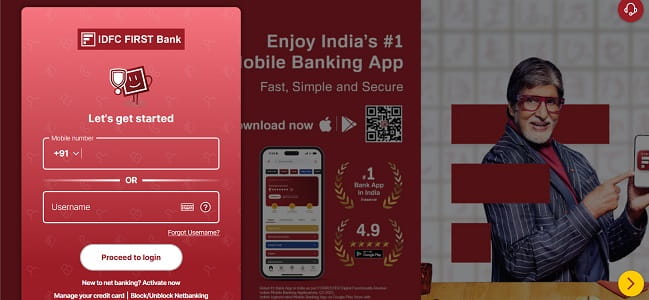
IDFC FIRST Bank uses a simple, mobile-first login process. Here’s the step-by-step guide:
Step 1: Open your browser and visit the official portal at https://my.idfcfirst.bank.in/login.
Step 2: You’ll see a clean login screen with two options — log in using your Mobile Number or your Username.
Step 3: Enter your registered Mobile Number (with +91 prefix) OR your Username in the designated field.
Step 4: Click “Proceed to Login”.
Step 5: On the next screen, enter your Login Password carefully. For added safety, use the on-screen virtual keyboard option to protect against keyloggers.
Step 6: As a second factor, you may be prompted to enter an OTP sent to your registered mobile number, especially if logging in from a new device.
If you’ve forgotten your username, simply click on the “Forgot Username?” link on the login page to retrieve it. The same login page also offers quick access to several handy services without logging in — including Block/Unblock Netbanking, Manage your credit card, ATM/branch locator, and Secure Usage Guidelines.
New User Registration: Step-by-Step Process
You can activate IDFC FIRST Bank Net Banking entirely online — no branch visit required — provided you have an active account.
Online Registration Process
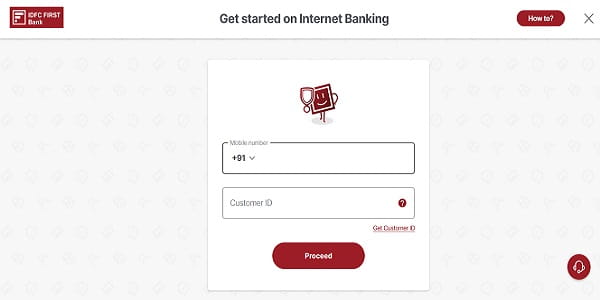
Step 1: Visit https://my.idfcfirst.bank.in/activate-net-banking directly, or go to the login page and click “New to net banking? Activate now”.
Step 2: On the “Get started on Internet Banking” page, enter:
- Your registered Mobile Number (with +91 prefix)
- Your Customer ID (UCIC) — if you don’t know it, click on “Get Customer ID” to retrieve it. Your Customer ID is also printed on your welcome kit and passbook.
Step 3: Click “Proceed” to continue.
Step 4: Verify your identity by entering your Account Number, Debit Card Number, or Loan Account Number.
Step 5: An OTP will be sent to your registered mobile number. Enter it for verification.
Step 6: Set up your credentials:
- Username: Create an alphanumeric username (typically 6 to 10 characters)
- Password: Choose a secure password (typically 6 to 15 characters) using a combination of uppercase letters, lowercase letters, numbers, and special characters
Step 7: Review the terms and conditions, click “Submit”, and your registration is complete. You can now log in immediately using your new credentials.
Branch-Based Registration
If you prefer, you can also visit the nearest IDFC FIRST Bank branch with your KYC documents (Aadhaar, PAN, etc.) and submit the registration form. Once verified, the bank will provide you with the credentials to activate net banking.
How to Reset Your IDFC FIRST Bank Net Banking Password
Forgotten passwords happen to everyone. IDFC FIRST Bank lets you reset your password instantly online without visiting a branch.
Reset Forgotten Password
Step 1: On the login page at https://my.idfcfirst.bank.in, click on the “Forgot Password” link, or visit https://my.idfcfirst.bank.in/forgot-password directly.
Step 2: On the “Forgot Password” page, enter:
- Your registered Mobile Number (with +91 prefix)
- Your Customer ID — if forgotten, click “Get Customer ID” to retrieve it
Step 3: Click “Proceed” to generate an OTP sent to your registered mobile number.
Step 4: Enter the OTP for verification.
Step 5: You may be asked to verify your identity using your Debit Card details (number, expiry, and ATM PIN) for additional authentication.
Step 6: Set your new password, ensuring it follows the bank’s complexity rules — combine uppercase letters, lowercase letters, numbers, and special characters. Avoid using your name or date of birth in the password.
Step 7: Confirm the new password and submit. A success message will appear, and your fresh credentials will be active immediately.
Forgot Username
If you’ve forgotten your username:
- Click on “Forgot Username?” on the login page.
- Enter your Customer ID, Country, and Mobile Number, along with the CAPTCHA.
- An OTP will be sent for verification.
- Once verified, your username will be sent to your registered email ID and displayed on the screen.
Important Security Tips
While IDFC FIRST Bank’s digital infrastructure is protected by strong encryption and two-factor authentication, your habits play an equally important role in keeping your account safe. The bank specifically recommends ensuring that the link of every page begins with https://my.idfcfirst.bank.in (or the corporate site at https://www.idfcfirst.bank.in). Never reveal your Internet Banking username, password, or token PIN to anyone, and never enter login details or sensitive information in any pop-up window.
Always look for the padlock icon next to the address bar and verify the HTTPS prefix in the URL before entering credentials. Avoid using public Wi-Fi or shared computers for net banking, log out completely after every session, and never save your username or password in your browser.
Never share your Customer ID, Username, Password, OTP, ATM PIN, or token PIN with anyone — including individuals claiming to be IDFC FIRST Bank officials. The bank will never ask for these details via phone, SMS, or email.
For technical assistance, you can contact IDFC FIRST Bank’s customer care:
- 24×7 Toll-Free Helpline: 1800-10-888 (for accounts, credit cards, loans, and other banking services)
- NRI Customer Support: +91-22-6248-5152
- WhatsApp Banking: +91-9555-555-555 (send “Hi” to start)
- Email: banker@idfcfirstbank.com
- NRI Email: nriservices@idfcfirstbank.com
For any digital fraud or suspicious activity, immediately report the incident to the National Cyber Crime Helpline at 1930. The Loans Team works from 9:30 AM to 6:00 PM daily, including bank holidays, while general banking support is available 24×7.
For mobile banking, IDFC FIRST Bank offers its top-rated IDFC FIRST Bank Mobile Banking app, available on both Google Play Store and Apple App Store. The app has been rated as the #1 Bank App in India per Forrester’s Q3 2023 Digital Functionality Review for Indian Mobile Banking Applications, with a 4.9-star rating on Google Play Store.
Final Thoughts
IDFC FIRST Bank’s net banking platform stands out in India’s digital banking landscape with its clean, modern interface, mobile-first login design, and zero-fee banking philosophy. The combination of multiple verification options (Account Number, Debit Card, Loan Account), instant online registration, and a top-rated mobile app makes it one of the most user-friendly banking platforms in India.
With the recent migration to the secure idfcfirst.bank.in domain and the bank’s commitment to security through DICGC registration, IDFC FIRST Bank continues to align with modern security standards while maintaining its customer-centric approach. Whether you’re logging in for the first time, registering as a new user, or recovering a forgotten password, the process is designed to be self-service and beginner-friendly.
By following the steps outlined in this guide and staying mindful of basic cyber hygiene, you can fully harness the convenience of IDFC FIRST Bank Net Banking — managing your money anytime, anywhere, without ever needing to wait in a branch queue again.