Biometric authentication has become an important part of modern ATM banking in India. Many ATM services now use fingerprint verification for Aadhaar Enabled Payment System (AePS) withdrawals, cardless transactions, customer authentication, and secure banking access. HDFC Bank ATMs also use biometric verification systems in selected banking operations.
However, due to heavy public usage and environmental exposure, ATM biometric scanners often develop sensor-related issues. Customers commonly face problems such as fingerprint mismatch errors, biometric timeout messages, failed verification attempts, and “Device Not Ready” alerts while using biometric ATM services.
Most of these problems are caused by dirty sensor surfaces, moisture interference, improper finger placement, or hardware-level scanner degradation.
Here is a complete guide to understanding and resolving HDFC Bank ATM biometric sensor cleaning and read errors.
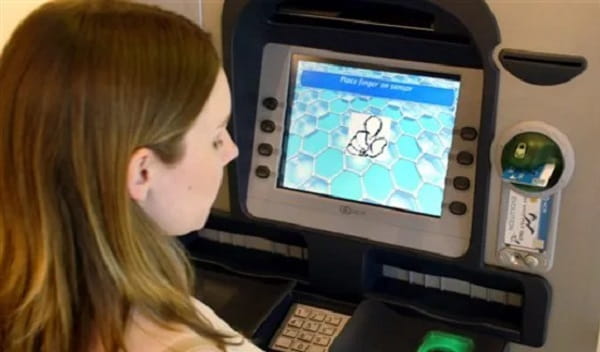
How ATM Biometric Sensors Work
ATM biometric systems usually rely on:
- Optical fingerprint sensors
- Capacitive fingerprint readers
- Ridge pattern extraction
- UIDAI authentication systems
- Encrypted biometric verification modules
The scanner captures the fingerprint image and extracts unique ridge patterns called minutiae points for identity matching. If the image quality becomes unclear, authentication fails.
Common Biometric Errors Users Face
Customers may encounter:
- “Biometric Match Failed”
- “Sensor Timeout”
- “Authentication Failed”
- “Device Not Ready”
- Fingerprint not detected
- Continuous retry prompts
- Slow sensor response
- Scanner freezing during verification
These issues become more common in humid environments and high-traffic ATM locations.
Main Causes Behind Biometric Read Errors
Smudges and Finger Oil Residue
Natural skin oils left by previous users create overlapping print layers on the sensor surface.
Dust and Humidity
Dust particles combined with moisture interfere with optical image clarity and ridge detection algorithms.
Wet or Sweaty Fingers
Moisture reflects scanner light unevenly, making fingerprint patterns unreadable.
Dry or Cracked Skin
Very dry fingers may not provide enough ridge contrast for accurate scanning.
Improper Finger Placement
Using only the fingertip instead of the full finger pad often causes incomplete scans.
Surface Scratches on the Scanner
Frequent rough cleaning may create micro-abrasions on the scanner glass, reducing image quality permanently.
How Customers Can Fix Biometric Read Errors
Clean and Dry Your Fingers
Before scanning:
- Remove sweat or sanitizer residue
- Wipe fingers with tissue or cloth
- Ensure fingers are not excessively wet
Wet surfaces commonly cause optical distortion.
Warm Up Dry Fingers
Very dry fingers may fail fingerprint detection.
You can:
- Rub hands together gently
- Warm fingers naturally
- Slightly moisturize fingertips using minimal moisture
This improves ridge visibility for the scanner.
Place Finger Correctly
Proper placement is extremely important.
Users should:
- Place the flat center of the finger on the scanner
- Avoid using only the fingertip
- Apply light, even pressure
- Hold still during scanning
Moving or rotating the finger during capture may interrupt authentication.
Retry Slowly Instead of Rapid Attempts
Repeated fast retries can overload the verification sequence temporarily.
Wait a few seconds between attempts.
Try Another Registered Finger
If one fingerprint repeatedly fails, try another finger already linked with Aadhaar records if available.
What ATM Staff and Engineers Should Do
ATM maintenance teams follow special cleaning procedures for biometric scanners.
Never Spray Liquid Directly
Liquids should never be sprayed onto the biometric sensor directly because they may damage internal circuits.
Use Microfiber Cloth Cleaning
Maintenance staff usually:
- Remove dust gently using dry microfiber cloth
- Use lint-free cloth with 70% isopropyl alcohol
- Wipe in one direction carefully
- Allow complete drying before reuse
This removes fingerprint residue safely.
Check Hardware Synchronization
Some errors are not caused by dirt but by software mismatches between:
- UIDAI verification systems
- ATM firmware
- Registered biometric devices
- Authentication drivers
Outdated modules may fail security verification requests.
Network and UIDAI Server Delays
Sometimes biometric failures are caused by temporary Aadhaar authentication server latency rather than the ATM hardware itself.
Users may simply need to retry later after network stabilization.
When to Report the ATM
If the ATM scanner repeatedly fails for multiple users, report the issue through:
- HDFC customer care
- Branch staff
- ATM helpdesk numbers
Provide:
- ATM location
- Time of issue
- Error message displayed
- Type of transaction attempted
Persistent faults may require full scanner replacement or recalibration.
Safety Tips While Using Biometric ATMs
Avoid Sharing Aadhaar OTPs
Never share OTPs or biometric-linked information with strangers.
Use Trusted ATM Locations
Prefer ATMs located:
- Inside bank branches
- Well-lit public areas
- CCTV-monitored zones
Avoid Excessive Force on Sensors
Pressing aggressively may damage the scanner surface over time.
Final Thoughts
HDFC Bank ATM biometric sensor cleaning and read errors are usually caused by dirty scanner surfaces, moisture interference, improper finger placement, or temporary UIDAI verification delays. Most problems can be solved through proper finger positioning, sensor cleaning, dry hands, and careful retry attempts.
As biometric banking infrastructure expands across India, maintaining clean sensors and updated authentication systems will remain essential for smooth and secure ATM operations.
FAQs
Q: Why does the ATM show “Biometric Match Failed”?
A: This usually happens when the scanner cannot capture a clear fingerprint image.
Q: Can wet fingers cause biometric failure?
A: Yes. Moisture distorts optical scanning and reduces fingerprint clarity.
Q: Why do dry fingers fail authentication?
A: Dry skin sometimes lacks enough ridge contrast for the scanner to detect properly.
Q: Is it safe to clean the sensor with water?
A: No. Liquids should never be sprayed directly onto biometric scanners.
Q: What type of cloth should be used for cleaning?
A: Microfiber or lint-free cloth is recommended for safe cleaning.
Q: Can server issues cause biometric errors?
A: Yes. UIDAI authentication delays may temporarily interrupt verification.
Q: Should I press hard on the scanner?
A: No. Light, even pressure works better than aggressive pressing.
Q: What if the scanner fails repeatedly for everyone?
A: The ATM may have hardware or software faults that require technical servicing.