In today’s digital-first economy, banking is no longer about long branch visits — it’s about getting things done with just a few clicks. Central Bank of India (CBI), one of the country’s oldest and most trusted public sector banks (founded in 1911), offers a comprehensive internet banking platform that empowers retail and corporate customers to handle nearly every financial task online. From transferring funds and paying bills to opening fixed deposits, applying for loans, and paying taxes, you can do it all from the comfort of your home or office.
This comprehensive guide walks you through every step of using Central Bank of India’s net banking with confidence.
What Is CBI Net Banking?
Central Bank of India’s internet banking platform gives retail and corporate customers 24×7 access to their accounts. Through this portal, you can transfer funds within CBI or to other banks via NEFT, RTGS, and IMPS, pay utility bills and credit card dues, open or close fixed and recurring deposits, request chequebooks, generate customised account statements, pay taxes, hotlist debit cards, register for government schemes like Atal Pension Yojana, and access dozens of other services.
The service is completely free for all CBI account holders. CBI offers internet banking in three modes — View Only, Tax Payment Only, and Full Transaction Rights — giving customers the flexibility to choose access levels that suit their needs. The platform uses two-factor authentication combining your User ID and Password with a second factor such as OTP, Grid Card, or Digital Signature. CBI also uses a dual-credential system — a separate Login Password for accessing the portal and a Transaction Password for authorising fund transfers.
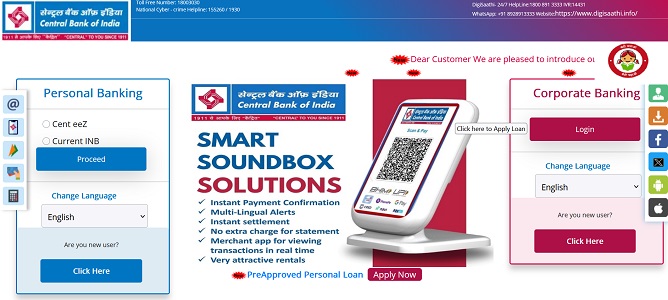
How to Login to CBI Net Banking
Once your net banking is activated and password is generated, logging in is straightforward. Here’s the step-by-step process:
Step 1: Open your browser and visit the official internet banking portal at https://www.inb.centralbank.bank.in. Always type the URL directly into the address bar.
Step 2: Click on “Personal Internet Banking” for individual accounts (or “Corporate Internet Banking” for business accounts).
Step 3: Enter your User ID (which is your CIF Number) in the designated field.
Step 4: Enter your Login Password carefully. Remember, the password is case-sensitive.
Step 5: Solve the CAPTCHA code displayed on the screen to confirm you’re not a bot.
Step 6: Click “Login” to proceed. As a second factor, you’ll be prompted to enter the OTP sent to your registered mobile number, or use your Grid Card values, or Digital Signature depending on your security profile.
If the system detects an unusual login pattern (such as a new device or location), it may also prompt you to answer one of your pre-set security questions for additional verification.
New User Registration: Step-by-Step Process
Unlike many private banks, Central Bank of India follows a two-step registration process — an initial branch-based application followed by online password generation. This adds an extra layer of security.
Branch-Based Application
Step 1: Visit your home branch (or any nearby CBI branch) and request the Internet Banking Registration Form. You can also download it from the bank’s website.
Step 2: Fill out the form completely, specifying your preferred facility type — View Only, Tax Payment Only, or Full Transaction Rights.
Step 3: Submit the form along with required KYC documents to the branch official. The bank typically processes the request within 24 to 48 hours.
Step 4: Once activated, your CIF Number automatically becomes your permanent User ID.
Online Password Generation
After your branch enables the facility, follow these steps to generate your login password online:
Step 1: Visit https://www.inb.centralbank.bank.in and click on “Online Password Generation” under the Personal Internet Banking section.
Step 2: Enter your CIF Number as the User ID along with the additional authentication details requested.
Step 3: Enter your Registered Mobile Number and click “Generate” to receive a One-Time Password.
Step 4: Enter the OTP to verify your identity.
Step 5: Set your Login Password following the bank’s complexity rules — combining uppercase letters, lowercase letters, numbers, and special characters.
Step 6: After your first login, generate your Transaction Password by navigating to “Options” → “Transaction Password Generation”. This separate password is required every time you transfer funds, add a beneficiary, or perform sensitive operations.
How to Reset Your CBI Net Banking Password
Forgotten passwords happen to everyone. CBI allows you to reset both your Login and Transaction passwords online without visiting a branch.
Reset Forgotten Login Password
Step 1: On the login page at https://www.inb.centralbank.bank.in, click on the “Forgot Password” or “Online Password Generation” link.
Step 2: Enter your CIF Number and Registered Mobile Number.
Step 3: Authenticate using one of the available methods:
- Debit Card details — enter your card number, expiry date, and ATM PIN, OR
- Security Questions — answer the questions you set up during your initial registration
Step 4: Enter the OTP sent to your registered mobile number for verification.
Step 5: Set your new Login Password, ensuring it meets the bank’s strength rules and is different from your previous passwords.
Step 6: Confirm the new password and submit. Your new credentials will be active immediately.
Generate or Reset Transaction Password
The Transaction Password is essential for authorising fund transfers and other financial activities. To generate or reset it:
- Log in to your CBI Net Banking account using your User ID and Login Password.
- Navigate to “Options” → “Transaction Password Generation”.
- Enter your Registered Mobile Number and click “Generate” to receive an OTP.
- Use the OTP to authenticate and set your new Transaction Password.
- Confirm the new password and submit.
If you can’t access your debit card or registered mobile number, you’ll need to visit your home branch with valid identification, or call customer care at 1800-3030 for assistance.
Important Security Tips
While CBI’s internet banking platform is built on robust security infrastructure with encrypted servers in the bank’s own data centre, your habits play an equally important role in keeping your account safe. Always log in only through the official URL — https://www.inb.centralbank.bank.in — by typing it directly into your browser. Never click on banking links from emails, SMS, or WhatsApp messages, as these often lead to phishing websites.
Verify the HTTPS prefix and padlock symbol in your browser before entering credentials. The bank specifically warns customers to ensure the address bar shows “https://” and never “http://” (which is unsecured). Avoid using public Wi-Fi or shared computers for banking, log out completely after every session, and clear your browser cache when using shared devices.
Never share your CIF Number, Login Password, Transaction Password, OTP, ATM PIN, or Grid Card values with anyone — including individuals claiming to be Central Bank of India officials. The bank will never ask for these details via phone, SMS, or email.
For technical assistance, you can contact CBI’s 24×7 customer care:
- General toll-free helpline: 1800-3030 (for mobile/online banking, ATM card blocking, fraud reporting)
- Pensioner support: 1800-203-1911
- PMJDY scheme queries: 1800-110-001 or 1800-180-1111
- WhatsApp Banking: +91-7900-123-123
- WhatsApp for grievances: +91-6364-861-866
- Email: customercare@cboi.in
For any digital fraud or suspicious activity, immediately report the incident to the National Cyber Crime Helpline at 1930. To check your account balance via missed call, dial 9555-244-442, or for a mini statement, dial 9555-144-441 from your registered mobile number.
For mobile banking, Central Bank of India offers the Cent Mobile app, available on both Google Play Store and Apple App Store. The bank has also introduced Cent eeZ, a modernised omni-channel application that offers a unified experience across web and mobile.
Final Thoughts
Central Bank of India’s net banking platform combines the reliability of one of India’s oldest public sector banks with modern digital banking conveniences. Its two-step registration process — branch application followed by online password generation — adds a layer of security that protects against unauthorised account creation. The flexible access modes (View Only, Tax Payment Only, Full Transaction Rights) make it suitable for users with varied needs, while the dual-password system (Login + Transaction) provides robust protection for financial operations.
With the recent migration of the bank’s corporate website to the secure centralbank.bank.in domain, CBI continues to align with modern security standards. Whether you’re logging in for the first time, registering as a new user, or recovering a forgotten password, the process is designed to be self-service and beginner-friendly. By following the steps outlined in this guide and staying mindful of basic cyber hygiene, you can fully harness the convenience of CBI Net Banking — managing your money anytime, anywhere, without ever needing to wait in a branch queue again.