In today’s digital-first economy, banking has shifted from branch counters to browser tabs — and IDBI Bank, formerly known as the Industrial Development Bank of India, has built a robust internet banking platform to keep pace with this shift. Known as i-Net Banking, the platform offers retail and corporate customers 24×7 access to a comprehensive suite of digital banking services. Whether you want to transfer funds, pay bills, manage deposits, apply for loans, or oversee your demat account, you can do it all from the comfort of your home or office.
What Is IDBI i-Net Banking?
IDBI Bank’s i-Net Banking is the bank’s secure online platform that gives all customers — retail individuals, proprietorship concerns, and corporate entities — round-the-clock access to their accounts. Through this portal, you can transfer funds within IDBI or to other banks via NEFT, RTGS, and IMPS, pay utility bills and credit card dues, open or close fixed and recurring deposits, request chequebooks, manage demat accounts, pay taxes, and access dozens of other services.
The service is completely free for all IDBI Bank account holders. The platform offers three modes of access — View Only, Tax Payment Only, and Full Transaction Rights — giving customers the flexibility to choose access levels suited to their needs. The platform is protected by SSL encryption and supports two-factor authentication via SMS OTP or the IDBI Bank Soft Token app, which generates OTPs even without network connectivity. IDBI uses a dual-credential system — a separate Login Password for accessing the portal and a Transaction Password for authorising fund transfers.
How to Login to IDBI i-Net Banking
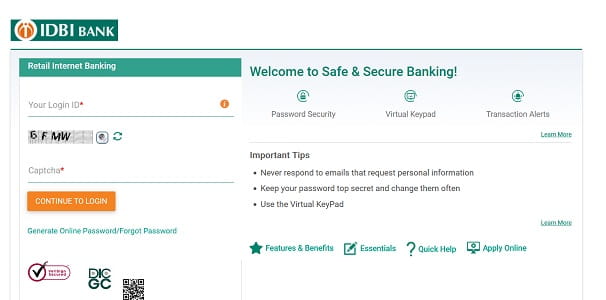
Once you’ve registered for the service, logging in is straightforward. Here’s the step-by-step process:
Step 1: Open your browser and visit the official IDBI i-Net Banking portal at https://inet.idbi.bank.in.
Step 2: Click on “Continue to Login” and accept the security disclaimer.
Step 3: Enter your User ID (which is typically your Customer ID provided by the bank).
Step 4: Enter your Login Password carefully. Use the on-screen virtual keyboard for added safety against keyloggers, especially on shared devices.
Step 5: Click “Login” to proceed.
Step 6: Depending on your security settings, you’ll be prompted for an OTP sent to your registered mobile number, or you can use your IDBI Bank Soft Token app for instant authentication.
For corporate users, the same login process applies but through the Corporate Internet Banking portal, with role-based access (view-only, maker, or full transaction rights) depending on what was specified during registration.
A note of caution: if you enter the wrong password multiple times in a row, your User ID will be locked. You’ll need to use the “Forgot Password” option to reset it before logging in again.
New User Registration: Step-by-Step Process
IDBI Bank offers two registration methods — online self-registration (using your debit card) for retail customers, and branch-based registration for those without a debit card or for corporate entities.
Online Registration with Debit Card
Step 1: Visit https://inet.idbi.bank.in and click on “Continue to Login”.
Step 2: On the next page, click on “Generate Online Password”.
Step 3: Enter your Customer ID, Account Number, and Registered Mobile Number. Your Customer ID can be found on your chequebook or passbook.
Step 4: Click “Submit”, then select “Generate New Password” and click “Proceed”.
Step 5: Enter your 16-digit Debit Card Number, ATM PIN, and Card Expiry Date. Accept the terms and conditions, then click “Generate OTP”.
Step 6: You’ll receive a Request ID and OTP on your registered mobile number. Enter both on the verification page and click “Confirm”.
Step 7: Set your Login Password and Transaction Password following the bank’s complexity rules. Make sure to enable the “Transaction Facility” option for full transaction rights.
Step 8: Click “Confirm” to complete the registration. You can now log in immediately using your new credentials.
Branch-Based Registration
If you don’t have an active debit card or are registering as a corporate entity, you’ll need to visit your home branch and submit the appropriate registration form:
- Retail customers: Submit the Channel Registration Form (CRF) at any IDBI branch.
- Corporate entities: Submit a duly filled Corporate Registration Form (CRF), signed by authorised signatories per your entity type (directors, partners, trustees, etc.). Required documents include identity proofs, board resolutions, and entity-specific declarations such as LLP agreements, trust deeds, or registration certificates.
After verification, your User ID and password will be sent to your registered email or postal address.
How to Reset Your IDBI Net Banking Password
Forgotten passwords happen to everyone. IDBI allows you to reset both your Login and Transaction passwords online.
Reset Forgotten Login Password
Step 1: On the login page at https://inet.idbi.bank.in, click on the “Forgot Password” or “Generate Online Password” link.
Step 2: Enter your User ID, Customer ID, and Account Number.
Step 3: Select your registered mobile number for OTP delivery and choose the service for which the password is being generated (Login Password, Transaction Password, or both).
Step 4: Authenticate using your Debit Card details — card number, expiry date, and ATM PIN.
Step 5: Enter the OTP sent to your registered mobile number for verification.
Step 6: Set your new password following the bank’s complexity rules. The password must be alphanumeric, should contain a mix of uppercase and lowercase letters, numbers, and special characters, and should not contain your Customer ID or name.
Step 7: Confirm the new password and submit. Your fresh credentials will be active immediately.
Reset Transaction Password
The Transaction Password is used to authorise fund transfers and other sensitive operations. To reset it:
- Log in to your IDBI i-Net Banking account using your User ID and Login Password.
- Navigate to the “Forgot Password” section and choose to reset your Transaction Password.
- Authenticate using your debit card details and OTP.
- Set your new Transaction Password and submit.
If you can’t access your debit card or registered mobile number, you’ll need to visit your home branch with valid identification to request a manual reset.
Important Security Tips
While IDBI’s i-Net Banking platform is built on robust SSL encryption and multi-layered security infrastructure, your habits play an equally important role in keeping your account safe. Always log in only through the official URL — https://inet.idbi.bank.in — by typing it directly into your browser. Verify the HTTPS prefix and padlock symbol before entering credentials.
Never click on banking links from unsolicited emails, SMS, or WhatsApp messages, as these often lead to phishing websites. Always validate the authenticity of any email asking you to update your password, ATM PIN, or login credentials — banks do not ask for such sensitive information through email. Avoid using public Wi-Fi or shared computers for net banking, log out completely after every session, and never save your User ID or password in your browser.
A particularly useful security feature offered by IDBI is the IDBI Bank Soft Token app, which generates secure OTPs on your mobile device — even without network connectivity. This is especially valuable for customers who travel frequently or are in low-network areas.
Never share your Customer ID, Login Password, Transaction Password, OTP, or ATM PIN with anyone — including individuals claiming to be IDBI Bank officials. The bank will never ask for these details via phone, SMS, or email. For technical assistance, you can call IDBI Bank’s 24×7 customer care:
- Toll-free helpline: 1800-209-4324 or 1800-22-1070
- Chargeable number: 022-67719100 (also for international callers as +91-22-67719100)
- Credit card hotlisting: 1800-22-6999
- Email: customercare@idbi.co.in
- NRI queries: nri@idbi.co.in
For any digital fraud or suspicious activity, immediately report the incident to the National Cyber Crime Helpline at 1930. For mobile banking, IDBI offers the Go Mobile+ app, available on both Google Play Store and Apple App Store, providing a complementary suite of services on your smartphone.
Final Thoughts
IDBI Bank’s i-Net Banking platform combines the reliability of a long-established financial institution with modern digital banking conveniences. Its flexible access modes (View Only, Tax Payment Only, Full Transaction Rights), dual-password system (Login + Transaction), and innovative Soft Token app for offline OTPs make it a secure and versatile platform for both individual and corporate users.
With the recent migration to the more secure idbi.bank.in domain, IDBI continues to align with modern security standards. Whether you’re logging in for the first time, registering as a new user, or recovering a forgotten password, the process is designed to be self-service and beginner-friendly. By following the steps in this guide and staying mindful of basic cyber hygiene, you can fully harness the convenience of IDBI i-Net Banking — managing your money anytime, anywhere, without ever needing to wait in a branch queue again.