In today’s digital-first economy, banking has shifted from branch counters to browser tabs — and Bank of India (BOI), one of India’s oldest public sector banks, has stepped up to meet this shift. In 2025, BOI consolidated its retail, corporate, and mobile banking services under a unified platform called Omni Neo, replacing its older StarConnect internet banking system. The new platform offers a more integrated, intuitive, and secure digital banking experience, available 24×7 in 12 Indian languages.
Recently, Bank of India also migrated its official website to a more secure domain — https://bankofindia.bank.in — replacing the older bankofindia.co.in URL. To get started with BOI Net Banking, you’ll need your Account Number, Registered Mobile Number, and an active Debit Card. This comprehensive guide walks you through every step of logging in, registering as a new user, and resetting your password using Bank of India’s Omni Neo platform.
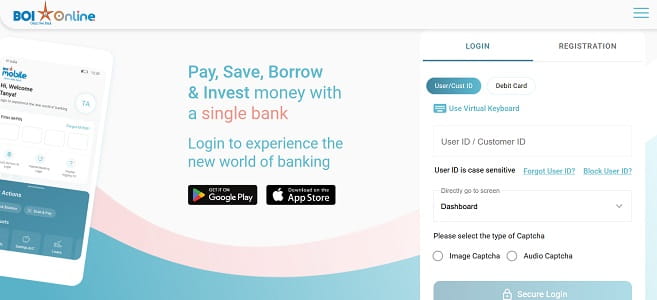
How to Login to BOI Net Banking
Once you’ve registered for the service, logging in is straightforward. Here’s the step-by-step process:
Step 1: Open your browser and visit the official Bank of India portal at https://bankofindia.bank.in.
Step 2: Click on “Internet Banking” and select “Retail” (for personal accounts) or “Corporate” (for business accounts) to access the Omni Neo Login page.
Step 3: Read the disclaimer and click “Agree” to proceed.
Step 4: Enter your User ID in the designated field.
Step 5: Enter your Login Password carefully. Remember, the password is case-sensitive.
Step 6: Solve the CAPTCHA code displayed on the screen and click “Login” to proceed.
Step 7: Depending on your security settings or if you’re logging in from a new device, you may be prompted for an OTP sent to your registered mobile number for two-factor authentication.
First-time login only: You’ll be required to set up security questions and answers, which will be used for future password recovery.
A note of caution: entering the wrong password three times in a row will lock your User ID. If that happens, you’ll need to reset your password through the “Forgot Password” option or contact customer care.
New User Registration: Step-by-Step Process
If you’re new to BOI Net Banking, you can register entirely online — no branch visit required — provided you have an active debit card and your mobile number is registered with the bank.
Online Registration Process
Step 1: Visit https://bankofindia.bank.in and click on “Internet Banking”, then select “Retail” to access the Omni Neo Retail Login page.
Step 2: Click on the “New User Registration” link.
Step 3: Enter your Account Number and Registered Mobile Number, solve the CAPTCHA, and click “Continue”.
Step 4: An OTP will be sent to your registered mobile number. Enter it for verification.
Step 5: Enter your Debit Card details — card number, expiry date, and ATM PIN — for authentication.
Step 6: Set your Login Password and Transaction Password following the bank’s complexity rules — combine uppercase letters, lowercase letters, numbers, and special characters for strong passwords.
Step 7: Once registration is successful, your User ID will be displayed on the screen. Note it down immediately, as you’ll need it every time you log in.
Alternative Registration via ATM
If you prefer, you can also initiate net banking registration through any BOI ATM:
- Insert your BOI Debit Card and enter your PIN.
- Select “Other Services” from the menu.
- Choose “Internet Banking Registration” and follow the on-screen prompts.
Branch-Based Registration (Corporate Customers)
Corporate customers must visit their nearest BOI branch and submit a duly filled corporate net banking registration form. Once verified, the bank will mail the Corporate ID, User ID, and Password through registered post.
How to Reset Your BOI Net Banking Password
Forgotten passwords happen to everyone. Bank of India makes the reset process completely online and instant.
Reset Forgotten Login Password
Step 1: On the login page at https://bankofindia.bank.in, click on the “Forgot Password” link.
Step 2: Enter your Internet Banking User ID and Account Number, then click “Continue”.
Step 3: Enter your Debit-cum-ATM Card details — card number (first four and last four digits), expiry date, and ATM PIN — for authentication.
Step 4: An OTP will be sent to your registered mobile number. Enter it to verify your identity.
Step 5: Set your new Login Password, ensuring it’s different from your previous passwords and contains a combination of uppercase letters, lowercase letters, numbers, and special characters (e.g., BoiSecure@2026).
Step 6: Confirm the new password and submit. Once successful, you can log in immediately with your fresh credentials.
Regenerate Transaction Password
To reset your Transaction Password (used for authorising fund transfers):
- Log in to your net banking account using your User ID and Login Password.
- Navigate to the “Options” menu and select “Regenerate Transaction Password”.
- Verify your identity using the OTP sent to your registered mobile number.
- Enter your Debit Card Number, Expiry Date, and ATM PIN for additional authentication.
- Set your new Transaction Password, confirm it, and submit. A success message will confirm the change.
If you can’t access your debit card or registered mobile number, you’ll need to visit your home branch with valid identification to request a manual reset.
Important Security Tips
While Bank of India’s Omni Neo platform is built on robust security infrastructure, your habits play an equally important role in keeping your account safe. Always log in only through the official URL — https://bankofindia.bank.in — by typing it directly into your browser. Verify the HTTPS prefix and padlock symbol before entering credentials, and never click on banking links sent via unsolicited emails, SMS, or WhatsApp messages.
Avoid using public Wi-Fi or shared computers for net banking. Make it a habit to log out completely after every session — don’t just close the browser. Disable the auto-fill or “remember password” feature in your browser, and clear your browser cache when using shared devices.
Never share your User ID, Login Password, Transaction Password, OTP, or ATM PIN with anyone — including individuals claiming to be Bank of India officials. The bank will never ask for these details via phone, SMS, or email. For any technical assistance, you can call BOI’s 24×7 toll-free helpline at 1800-103-1906 or 1800-220-229. International customers can dial +91-22-40919191 (chargeable). For general queries, you can email BOI.Callcentre@bankofindia.bank.in or send WhatsApp messages to 7997-987-601.
In case of any digital fraud or suspicious activity, immediately report the incident to the National Cyber Crime Helpline at 1930 and inform the bank as well. To check your account balance via missed call, dial 9811-255-430 or 9811-255-450 from your registered mobile number.
For mobile banking, Bank of India offers the BOI Mobile app, which can be downloaded from the Google Play Store or Apple App Store and provides comprehensive banking services on the go.
Final Thoughts
Bank of India’s transition from the legacy StarConnect system to the unified Omni Neo platform marks a significant step forward in the bank’s digital banking journey. By consolidating retail, corporate, and mobile services under a single secure framework — and migrating to the more secure bankofindia.bank.in domain — BOI now offers a more streamlined and modern internet banking experience.
Whether you’re logging in for the first time, registering as a new user, or recovering a forgotten password, the process is designed to be self-service and beginner-friendly. By following the steps outlined in this guide and staying mindful of basic cyber hygiene, you can fully harness the convenience of BOI Net Banking — managing your money anytime, anywhere, without ever needing to wait in a branch queue again.