In today’s digital-first economy, banking is no longer about visiting branches and waiting in queues — it’s about getting things done in just a few clicks. Bank of Baroda (BoB), one of India’s largest public sector banks, has unified its digital banking services under the bob World Internet brand, offering retail and corporate customers 24×7 access to a comprehensive suite of online services. From transferring funds and paying bills to opening fixed deposits, applying for loans, and managing investments, you can do it all from the comfort of your home or office.
This comprehensive guide walks you through every step clearly so you can use bob World Internet with confidence.
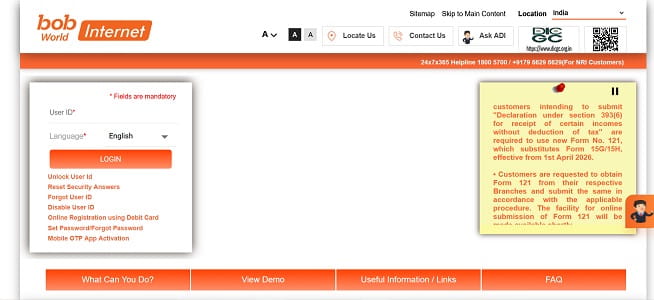
How to Login to bob World Internet
Once you’ve registered for the service, logging in is straightforward but follows a multi-step security process. Here’s the step-by-step guide:
Step 1: Open your browser and visit the official portal at https://bobibanking.bankofbaroda.bank.in.
Step 2: Select “Retail User” if you have a personal account, or “Corporate User” for business accounts.
Step 3: Enter your User ID and click “Login”.
Step 4: On the next screen, enter your Sign-on Password along with the CAPTCHA code displayed. Remember, the password is case-sensitive.
Step 5: Authenticate using the OTP sent to your registered mobile number for two-factor security.
Step 6: First-time login only — you’ll be prompted to enrol in BoB’s security programme by:
- Setting a personal message that will be displayed every time you log in (this helps you verify you’re on the genuine BoB site).
- Selecting and answering 5 security questions. Keep these answers safe — they’re often required for password resets.
Once enrolled, you’ll land on your bob World Internet dashboard with a welcome message.
New User Registration: Step-by-Step Process
If you’re new to bob World Internet, you can register entirely online using your debit card — no branch visit required. If you don’t have a debit card, you’ll need to submit a registration form at your base branch.
Online Registration with Debit Card
Step 1: Visit https://bobibanking.bankofbaroda.bank.in and click on “Retail User”.
Step 2: Click on the “Online Registration using Debit Card” link available on the login page.
Step 3: Enter your Debit Card details — card number, expiry date, and ATM PIN — and click “Validate”.
Step 4: An OTP will be sent to your registered mobile number. Enter it and click “Continue”.
Step 5: Your details will be displayed on the screen for verification. Create your User ID, Sign-on Password, and Transaction Password, then click “Continue”.
Step 6: Return to the login page and log in using your new User ID, Sign-on Password, and CAPTCHA code.
Step 7: A welcome message will appear. Click “Enroll Now” and complete the security enrollment by selecting your 5 security questions, providing answers, and confirming your password.
Alternative Registration Methods
If you have the bob World Mobile Banking app, you can also register through it by going to Login → Request Services → Internet Banking Registration. Customers without a debit card can visit their base branch with a duly filled internet banking registration form. The bank will issue a User ID and password through registered post within a few working days.
How to Reset Your bob World Internet Password
Forgotten passwords happen to everyone. Bank of Baroda allows you to reset both your Sign-on Password and Transaction Password online without visiting a branch.
Reset Forgotten Password
Step 1: On the login page at https://bobibanking.bankofbaroda.bank.in, click on the “Set Password / Forgot Password” link.
Step 2: Choose what you want to reset — the Sign-on Password, Transaction Password, or both.
Step 3: Enter your User ID and authenticate using one of the available methods:
- Method A — Debit Card: Enter your debit card number, expiry date, and ATM PIN.
- Method B — OTP: Receive a One-Time Password on your registered mobile number to verify your identity.
Step 4: Once verified, you’ll be prompted to set your new password(s). The password must be different from your previous passwords and should contain a combination of uppercase letters, lowercase letters, numbers, and special characters such as #, $, @.
Step 5: Confirm your new password and submit. You’ll receive an on-screen confirmation, and your new password will be active immediately.
If you can’t access your registered mobile number or debit card, you’ll need to visit your base branch with valid identification to reset your credentials manually.
Important Security Tips
While bob World Internet is built with strong AES-256 encryption, your habits play an equally important role in keeping your account safe. Always log in only through the official URL — https://bobibanking.bankofbaroda.bank.in — and verify the padlock symbol in your browser before entering credentials. Make a habit of typing the URL directly rather than clicking on links from emails, SMS, or WhatsApp messages, as these often lead to phishing websites.
Bank of Baroda specifically advises customers to never save their internet banking password in browsers using the default “save password” option — always enter it manually. Avoid using public Wi-Fi or shared computers for banking, log out completely after every session, and clear your browser cache when using public devices. Make sure your registered mobile number and email ID are always up to date — visit your base branch if any changes are required.
Never share your User ID, Sign-on Password, Transaction Password, OTP, ATM PIN, or security question answers with anyone — including individuals claiming to be Bank of Baroda officials. The bank will never ask for these details via phone calls, SMS, or email. If your mobile is unexpectedly deactivated or you suspect a SIM swap fraud, contact the bank immediately, as scammers often use this technique to intercept OTPs.
For technical assistance or to report any suspicious activity, you can call BoB’s 24x7x365 helpline at 1800-5700 or 1800-5000. NRI customers can dial +91-79-6629-6629. In case of any digital fraud, immediately report the incident to the National Cyber Crime Helpline at 1930 and also file a complaint with the bank’s call centre.
Final Thoughts
bob World Internet has transformed how millions of Indians manage their finances, offering a robust, secure, and feature-rich alternative to traditional branch banking. Its dual-password system — separating login access from transaction authorisation — combined with AES-256 encryption and a mandatory security enrollment programme makes it one of the safest digital banking platforms in the country.
Whether you’re logging in for the first time, registering as a new user, or recovering a forgotten password, the process is designed to be self-service and beginner-friendly. With the recent migration to the new, more secure domain at https://bobibanking.bankofbaroda.bank.in, the experience has become even more streamlined and aligned with modern security standards. By following the steps outlined in this guide and staying mindful of basic cyber hygiene, you can fully harness the convenience of bob World Internet — managing your money anytime, anywhere, without ever needing to wait in a branch queue again.