In today’s digital-first economy, banking is no longer about long branch visits and paperwork — it’s about getting things done in just a few clicks. Union Bank of India (UBI), one of the country’s largest public sector banks, offers a comprehensive internet banking platform that empowers retail and corporate customers to handle nearly every financial task online. From transferring funds and paying bills to opening fixed deposits, applying for loans, and managing investments, you can do it all from the comfort of your home or office.
A standout feature of Union Bank’s digital platform is the Self User Creation facility, which allows new customers to register entirely online without visiting a branch. To get started, you’ll need your 15-digit Account Number, Date of Birth or PAN, an active Debit Card, and your Registered Mobile Number.
What Is Union Bank Net Banking?
Union Bank Net Banking is the bank’s secure online platform that gives customers 24×7 access to their accounts. Through this portal, you can transfer funds within Union Bank or to other banks via NEFT, RTGS, and IMPS, pay utility bills (electricity, telephone, insurance premiums, mutual funds, credit cards), make tax payments, book air or railway tickets, request chequebooks, generate account statements, and access dozens of other services from a single dashboard.
The service is completely free for all Union Bank account holders and is protected by 128-bit to 256-bit SSL encryption — the highest level of security available for online communication. Union Bank has also implemented 3-Factor Authentication (3FA) as a mandatory security layer, requiring users to enrol with three challenge questions during registration. The platform uses a dual-password system — a separate Login Password to access the portal and a Transaction Password to authorise fund transfers.
How to Login to Union Bank Net Banking
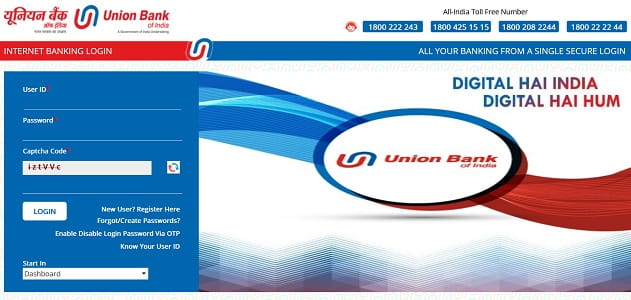
Once you’ve registered for the service, logging in is straightforward. Here’s the step-by-step process:
Step 1: Open your browser and visit the official portal at https://www.unionbankonline.bank.in. Always type the URL directly into the address bar rather than clicking on links.
Step 2: Click on “Retail Login” for personal accounts, or “Corporate Login” for business accounts.
Step 3: Enter your User ID in the designated field. If you’ve forgotten it, use the “Know Your User ID” link available on the website.
Step 4: Enter your Login Password carefully. Remember, both User ID and password are case-sensitive. For added safety, use the on-screen virtual keyboard to protect against keyloggers.
Step 5: Solve the CAPTCHA code displayed on the screen.
Step 6: Click “Login” to proceed. Depending on your security settings or if you’re logging in from a new device, you may be prompted for an OTP sent to your registered mobile number, or asked to answer one of your 3 challenge questions.
A note of caution: entering the wrong password 3 times in a row will disable your User ID. You can re-enable it through the “Enable/Disable User via OTP” option available on the login page. Also, if you provide incorrect answers to your challenge questions, your internet banking access will be blocked.
New User Registration: Step-by-Step Process
Union Bank’s Self User Creation facility makes registration entirely online. You can choose between two facility types — “View Facility” (without a debit card, for view-only access) or “Transaction Facility” (with a debit card, for full access).
Online Registration with Debit Card (Transaction Facility)
Step 1: Visit https://www.unionbankonline.bank.in and click on the “Self User Creation” link.
Step 2: Select “Online Self User Creation – Retail users having Debit Card” (for full transaction rights) and click “Continue”.
Step 3: Enter your Account Number, Date of Birth or PAN Number, and the CAPTCHA code, then proceed.
Step 4: Enter your Debit Card Number and ATM PIN using the virtual keyboard for security.
Step 5: Verify your identity by entering details of any one of your last five transactions — including the exact amount and transaction type. For example, if you spent ₹500.50, you’ll need to enter 500 in the Rupee field and 50 in the Paise field.
Step 6: Accept the terms and conditions and click “Submit”. An OTP will be sent to your registered mobile number — enter it to complete the verification.
Step 7: Once verified, your User ID will be displayed on the screen. Set your Login Password and Transaction Password following the bank’s complexity rules — minimum 8 and maximum 14 characters with at least one digit, one special character, and one letter (no spaces allowed).
Important: Before you proceed, ensure your Date of Birth, PAN, mobile number, email ID, occupation code, and constitution code are all updated in the bank’s records. Your debit card must also be linked to your account and active. Once registered, your internet banking access will typically be available within 24 to 48 hours.
Registration Without Debit Card (View Facility)
If you don’t have a debit card, you can still register for “View Facility” to access account information and statements. Corporate customers must visit their base branch with a duly filled application form to register for net banking.
How to Reset Your Union Bank Net Banking Password
Forgotten passwords happen to everyone. Union Bank allows you to reset both your Login and Transaction passwords online through its self-service module.
Five Must-Have Requirements Before You Begin
Before initiating a password reset, ensure that:
- You have your Internet Banking User ID, ATM Card number, and ATM PIN ready (if using debit card method).
- Your account number is linked with your ATM Card.
- Your Date of Birth and PAN are present in the bank’s records.
- Your mobile number is registered with the branch.
- Your email ID is registered with the branch.
If any of these details are missing, visit your branch to update them first.
Reset Forgotten Password
Step 1: On the login page at https://www.unionbankonline.bank.in, click on “Forgot/Create Password” or “Reset Password”.
Step 2: Choose your reset option — “Online reset of Login/Transaction Password – Retail users having Debit Card” or the equivalent without-debit-card option.
Step 3: Enter your User ID, Account Number, and Date of Birth or PAN for verification.
Step 4: Enter your Debit Card Number and ATM PIN for authentication.
Step 5: Verify a recent transaction by entering the exact amount of any one of your last five transactions.
Step 6: Choose whether to reset the Login Password, Transaction Password, or Both. Set your new password ensuring it meets the bank’s strength rules (8–14 characters with letters, numbers, and special characters; should not be the same as your last three passwords).
Step 7: Enter the OTP sent to your registered mobile number to authorise the change. Once submitted, your new password will be active immediately.
If you can’t access your debit card or registered mobile number, you can email ebanking@unionbankofindia.com to request a printable password kit (charges may apply), or visit your base branch for manual reset.
Important Security Tips
While Union Bank employs strong encryption and multi-factor authentication, your habits play an equally important role in keeping your account safe. Always log in only through the official URL — https://www.unionbankonline.bank.in — by typing it directly into your browser. Verify the “https://” prefix and padlock symbol before entering credentials. Avoid using cyber cafés or shared PCs for net banking, and always log out properly rather than just closing the browser.
Make it a habit to check the last login date and time displayed on your post-login dashboard — this helps you detect any unauthorised access. Keep your operating system, browser, and antivirus software updated, and ensure your firewall is always on.
A unique safety feature of Union Bank’s net banking is the cooling period — when you add a new beneficiary for fund transfers, there’s a mandatory waiting period of a few hours before you can transfer money to them, which protects you from instant fraud.
Never share your User ID, passwords, OTP, ATM PIN, debit card details, or challenge question answers with anyone — including individuals claiming to be Union Bank officials. The bank will never ask for these details via phone, SMS, or email. Be especially cautious of fake customer care numbers circulated online — Union Bank has officially flagged numbers like 06206419089 as fraudulent.
For genuine customer support, call Union Bank’s 24×7 toll-free helpline at 1800-22-22-44 or 1800-208-2244. To report any phishing attempt, email antiphishing.ciso@unionbankofindia.bank. For digital fraud, immediately call the National Cyber Crime Helpline at 1930.
For mobile banking, Union Bank offers the Union ease app (rebranded from the earlier VYOM app), which can be downloaded from the Google Play Store or Apple App Store.
Final Thoughts
Union Bank of India’s net banking platform has redefined how millions of Indians manage their finances, offering a robust, secure, and feature-rich alternative to traditional branch banking. Its Self User Creation facility allows new customers to register without ever visiting a branch, while its 3-Factor Authentication, dual-password system, and transaction-based identity verification make it one of the most secure online banking platforms among Indian public sector banks.
Whether you’re logging in for the first time, registering as a new user, or recovering a forgotten password, the process is designed to be self-service and beginner-friendly. By following the steps outlined in this guide and staying mindful of basic cyber hygiene, you can fully harness the convenience of Union Bank Net Banking — managing your money anytime, anywhere, without ever needing to wait in a branch queue again.