In today’s digital-first economy, banking has shifted from branch counters to browser tabs — and Kotak Mahindra Bank has long been at the forefront of this shift. Known for its sleek, intuitive digital experience, Kotak Net Banking offers retail and corporate customers 24×7 access to a comprehensive suite of banking services. Whether you want to check your balance, transfer funds, pay bills, book a fixed deposit, apply for a loan, or manage investments, you can do it all from a single, beautifully designed online dashboard.
For first-time users, however, getting started can feel slightly unfamiliar — especially because Kotak’s primary identifier isn’t an account number but a Customer Relationship Number (CRN), typically printed on the bottom-left of your debit card or in your welcome kit. If you don’t know your CRN, you can simply SMS CRN to 9971056767 from your registered mobile number to receive it instantly.
This comprehensive guide walks you through every step of logging into Kotak Net Banking, registering as a new user, and resetting your password — all using the official portal at https://netbanking.kotak.com.
What Is Kotak Net Banking?
Kotak Net Banking is the bank’s secure online platform that gives customers round-the-clock access to their accounts. Through the redesigned One Page Banking interface, you can transfer funds within Kotak or to other banks via NEFT, RTGS, and IMPS, pay utility bills and credit card dues, open or close fixed and recurring deposits, manage debit and credit cards, invest in mutual funds, apply for IPOs, recharge mobile and DTH connections, and even book flights and hotels — all in one place.
The service is completely free for all Kotak Mahindra Bank account holders and is protected by 256-bit SSL encryption and multi-layer authentication. The platform also lets you customise your dashboard, set transaction shortcuts, and view a consolidated picture of all your relationships with the bank.
How to Login to Kotak Net Banking
Once you’ve registered for the service, logging in is quick and secure. Here’s the step-by-step process:
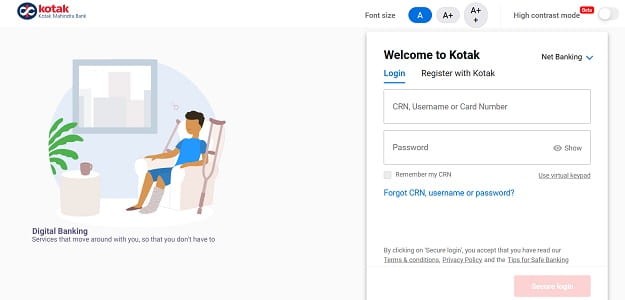
Step 1: Open your browser and visit the official Kotak Net Banking portal at https://netbanking.kotak.com.
Step 2: Enter your CRN, Username, or Card Number (debit, credit, or forex card) in the designated field and click “Next”.
Step 3: Enter your Net Banking Password carefully. Remember, the password is case-sensitive. For added safety, use the Virtual Keypad on the screen — especially on shared or public devices — to protect against keyloggers.
Step 4: Click “Secure Login” to proceed.
Step 5: Depending on your security settings, you’ll be prompted for two-factor authentication:
- Secure Access (OTP) — an OTP sent to both your registered mobile number and email.
- Mobile App Approval — a notification sent to your Kotak Mahindra Bank Mobile App, which you can approve using your MPIN or biometrics.
Once authenticated, you’ll land on your One Page Banking dashboard. If you forget your CRN, you can click “What is my CRN/CIF/Customer ID?” on the login page for instant retrieval.
New User Registration: Step-by-Step Process
If you’re new to Kotak Net Banking, you can register entirely online — no branch visit required — using your CRN and an active debit, credit, or forex card.
Online Registration Process
Step 1: Visit https://netbanking.kotak.com and click on the “Register With Kotak?” option.
Step 2: Enter your CRN or your 16-digit Card Number (debit, credit, or forex card) and click “Next”.
Step 3: An OTP will be sent to your registered mobile number and email ID. Enter the OTP to verify your identity.
Step 4: Choose your preferred authentication method:
- Debit / Credit / Forex Card — enter your card number, expiry date (MM/YY format), CVV (3 digits), and Card PIN (4 to 6 digits).
- Kotak Mobile App — if you already use the Kotak Mahindra Bank Mobile App, you can approve the net banking activation request directly through the app’s “Approve Net Banking Request” option.
Step 5: Set a strong password that follows Kotak’s security rules — typically 8 to 60 characters with a mix of uppercase letters, lowercase letters, numbers, and special characters.
Step 6: Set up your security questions by selecting and answering a set of questions. These will be used for future identity verification when resetting passwords or recovering access.
Step 7: Submit the details to complete registration. You can now log in instantly using your CRN and new password.
How to Reset Your Kotak Net Banking Password
Forgotten passwords happen to everyone. Kotak makes the reset process completely online and instant.
Reset Forgotten Password
Step 1: On the login page at https://netbanking.kotak.com, click on the “Need Help?” option, then select “I want to generate my password”. Alternatively, on the password entry screen, click on the “Forgot Password” option.
Step 2: Enter your CRN, Username, or Card Number.
Step 3: Enter your registered mobile number. If your mobile number isn’t registered with the bank, you won’t be able to proceed with online reset and will need to contact customer care or visit a branch.
Step 4: Once your details match, an OTP will be sent to both your registered mobile number and email ID. You can also request a Voice OTP if you have trouble receiving SMS. Enter the OTP to proceed.
Step 5: Choose your preferred authentication method:
- Card Authentication — enter your Debit/Credit/Forex Card details: card number (numeric only), expiry date (MM/YY), CVV (3 digits), and Card PIN (4 to 6 digits, masked on entry).
- Security Questions — answer 2 of the 4 security questions you set up during registration. You’ll have the option to change a question if you can’t recall the answer.
Step 6: Once successfully validated, you’ll be taken to the Set New Password screen. Enter and re-enter your new password, ensuring it meets the bank’s strength requirements.
Step 7: Submit to confirm the change. You’ll receive an email and SMS alert on your registered email ID and mobile number confirming the successful password update.
A note of caution: if you enter the wrong mobile number 3 times during the password reset process, online password regeneration will be locked for 12 hours as a security precaution.
Important Security Tips
While Kotak’s digital infrastructure is among the most advanced in Indian banking, your habits play an equally important role in keeping your account safe. Always log in only through the official URL — https://netbanking.kotak.com — by typing it directly into your browser. Never click on banking links sent via email, SMS, or WhatsApp from unknown sources, as these often lead to phishing websites.
Avoid accessing net banking from public or shared computers; if you must, always use the Virtual Keypad to enter your credentials. Make it a habit to log out completely after every session — don’t just close the browser. Also, disable the auto-fill or “remember password” feature in your browser to keep your credentials safe, and clear your browser cache and history after each session on shared devices.
Never share your CRN, Net Banking Password, OTP, CVV, Card PIN, or security question answers with anyone — including individuals claiming to be Kotak Mahindra Bank officials. The bank will never ask for these details via phone, SMS, or email. For any technical assistance, you can call Kotak’s 24×7 customer care at 1860-266-2666 or +91 22 6600 6022 for international queries.
Final Thoughts
Kotak Net Banking has redefined the digital banking experience in India, combining a beautifully designed One Page Banking interface with strong security features and a wide range of services. With instant online registration, multiple authentication options, voice OTP support, and seamless mobile app integration, the platform is built for both convenience and trust.
Whether you’re logging in for the first time, registering as a new user, or recovering a forgotten password, the process is designed to be self-service and beginner-friendly. By following the steps outlined in this guide and staying mindful of basic cyber hygiene, you can fully harness the convenience of Kotak Net Banking — managing your money anytime, anywhere, without ever needing to wait in a branch queue again.