In today’s digital-first economy, where convenience is everything, Axis Bank — India’s third-largest private sector bank — offers a powerful and secure internet banking platform to its retail and corporate customers. Axis Bank Net Banking puts your finances at your fingertips, letting you transfer funds, pay bills, manage deposits, apply for loans, and access dozens of other banking services round the clock — all without ever stepping into a branch.
For first-time users, however, the registration and login process can feel a little unfamiliar, especially because Axis Bank uses its proprietary NetSecure two-factor authentication system. Before you start, make sure you have your unique 9-digit Customer ID handy — it’s available in your welcome letter, on the first page of your chequebook, or by sending an SMS in the format CUSTID <15-digit Account Number> to 56161600 (or +919951860002 for NRI customers) from your registered mobile number.
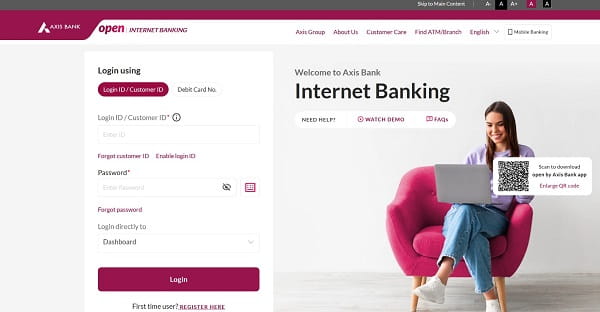
How to Login to Axis Bank Net Banking
Once you’ve registered for the service, logging in is quick and simple. Here’s the step-by-step process:
Step 1: Open your browser and visit the official Axis Bank Net Banking portal at https://www.axis.bank.in/bank-smart/internet-banking
Step 2: Enter your Customer ID (or your personalised Login ID, if you’ve created one) along with your Login Password.
Step 3: Solve the image captcha displayed on the screen to confirm you’re not a bot.
Step 4: Click “Login” to proceed.
Step 5: NetSecure Authentication — depending on your settings, you’ll either receive an OTP via SMS on your registered mobile number or be prompted to generate a code using the Axis Mobile Banking App. Enter the code to complete the login.
Step 6: First-time login only — you’ll be required to set three security questions and their answers, which will be used for future password recovery.
A note of caution: entering the wrong password multiple times will lock your Login ID. If that happens, you can use the “Enable Login ID” link on the login page to unlock it.
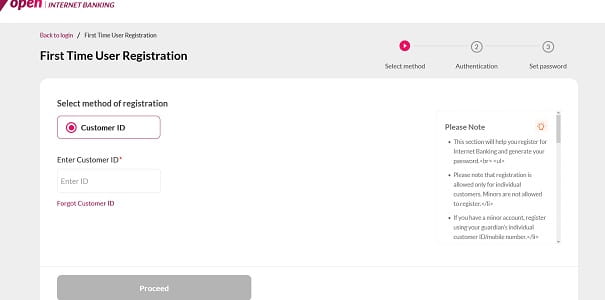
New User Registration: Step-by-Step Process
If you’re new to Axis Bank Net Banking, you can register entirely online — no branch visit required — provided you have an active savings or current account.
Online Registration Process
Step 1: Visit https://www.axis.bank.in/bank-smart/internet-banking and click on the “Register here” link on the login page.
Step 2: Enter your Customer ID or Registered Mobile Number and click “Proceed”.
Step 3: Choose one of the available authentication methods:
- Debit Card — enter your card number, expiry date, and ATM PIN.
- OTP — enter your Date of Birth and PAN Card number. You’ll receive two separate OTPs — one on your registered mobile and one on your registered email — both of which need to be entered for verification.
- Email Link — verify through a secure link sent to your registered email.
- KYC Details — verify by entering your KYC information.
Step 4: Once authenticated, set a secure Login Password of your choice. The password should follow the bank’s strength rules — combining uppercase letters, lowercase letters, numbers, and special characters.
Step 5: Set three security questions and answers that will help you recover your password in the future.
Step 6: Optionally, you can create a personalised Login ID (alphanumeric) to use instead of your Customer ID for future logins.
Step 7: Submit the details. An OTP will be sent to your registered mobile number for final confirmation. Enter it to complete the process. You can now log in instantly using your new credentials.
How to Reset Your Axis Bank Net Banking Password
Forgotten passwords happen to everyone. Axis Bank makes the reset process completely online and instant.
Reset Forgotten Password
Step 1: On the login page at https://retail.axisbank.co.in, click on the “Reset Here” or “Forgot Password” link.
Step 2: Enter your Customer ID and click “Proceed”.
Step 3: Choose your preferred authentication method:
- OTP & Email — provide your Date of Birth and PAN, then enter the codes sent to your registered mobile and email.
- Debit Card — input your card number, expiry, and ATM PIN.
Step 4: Once verified, set your new password. It must be 8 to 28 characters long and include at least one number, one uppercase letter, and one special character.
Step 5: Re-enter the password to confirm and submit. You’ll receive a confirmation SMS on your registered mobile number, and you can log in immediately with your new credentials.
Unlock Your Login ID
If your Login ID is disabled due to too many failed login attempts, you don’t need to visit a branch. Simply click the “Enable Login ID” link on the login page, verify your identity using your Customer ID along with OTP or debit card details, and your access will be restored instantly.
Important Security Tips
While Axis Bank’s NetSecure system is one of the most advanced in Indian banking, your habits play an equally important role in keeping your account safe. Always log in only through the official URL — https://www.axis.bank.in/bank-smart/internet-banking — accessible via the main Axis Bank website. Verify the padlock symbol in your browser before entering credentials, and avoid using public Wi-Fi for banking.
Never share your Customer ID, password, OTP, ATM PIN, or NetSecure code with anyone — including individuals claiming to be Axis Bank officials. The bank will never ask for these details via phone, SMS, email, or WhatsApp. Avoid clicking on banking-related links received through unsolicited messages, as these often lead to phishing websites.
For any technical issues or assistance, you can call Axis Bank’s 24×7 customer care at 1860-419-5555 or 1860-500-5555, or email queries to customer.service@axisbank.com.
Final Thoughts
Axis Bank Net Banking has redefined how millions of Indians manage their finances, offering a secure, feature-rich, and intuitive alternative to traditional branch banking. With its proprietary NetSecure two-factor authentication, multiple verification options during registration, and instant online password recovery, the platform balances strong security with effortless usability.
Whether you’re logging in for the first time, registering as a new user, or recovering a forgotten password, the process is designed to be self-service and beginner-friendly. By following the steps in this guide and staying mindful of basic cyber hygiene, you can fully harness the convenience of Axis Bank Net Banking — managing your money anytime, anywhere, without ever needing to wait in a branch queue again.